شراء العملات المشفرة
بطاقة
تداول P2P
اشتر USDT عبر السوق
بطاقة الائتمان/الخصم
اشترِ العملات المشفرة باستخدام Visa أو Mastercard
الدفع من جهة خارجية
اشترِ العملات المشفرة عبر MoonPay و Simplex والمزيد
بطاقة بيتمارت
تعزيز قدرات حياتك في مجال العملات المشفرة
بطاقة مسبقة الدفع للعملات المشفرة
احصل على بطاقة ماستركارد صالحة للاستخدام فورًا
Rewards
السحب اليومي للحسابات الآجلة
فرصة ربح مضمونة بنسبة 100% مع التداولات اليومية
السحب اليومي لحساب فوري
اكسب 8888 USDT في الجوائز الكبرى
شحن رصيد الهاتف المحمول
شحن الرصيد بسهولة، عبر الإنترنت، وبأمان
Send
Send money globally, fast and secure
BitMart Mall
بث مباشر للعملات المشفرة
How to download and install the Android BitMart App?
You can copy the following link directly and open it in your mobile browser to complete the download and installation. 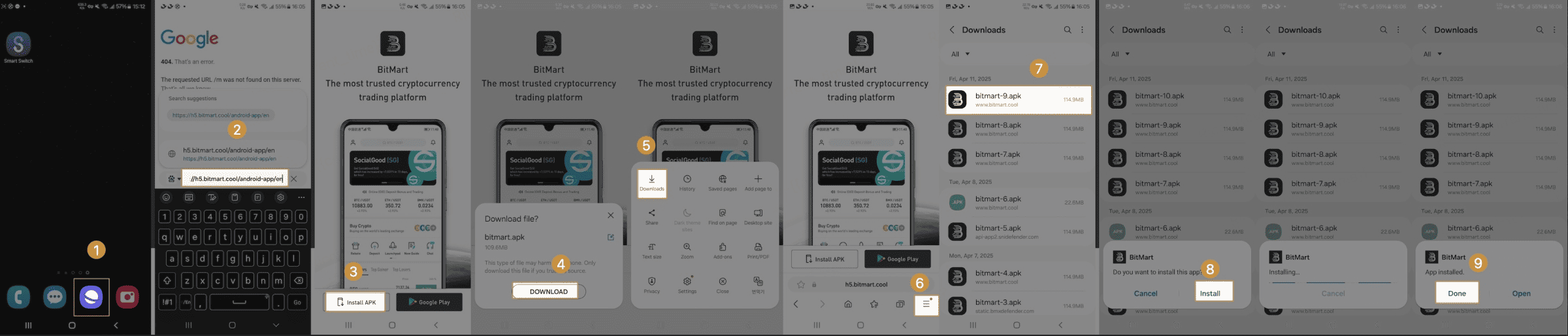
*Download link1: https://h5.bitmart.com/android-app/en
*Download link2: https://h5.bitmart.com/android-app/en
- Step1: Open the link in your mobile browser, and click [Install APK] to download the BitMart App.
- Step2: After downloading, go to the download list and click [bitmart.apk] to install
- Step3: If a prompt pops up during installation, just continue to select [install]. The last word Done indicates that the installation is complete